Power Adapter Configuration
WalleCube Smart UPS supports a wide range of voltage input and output from 9V to 20V. Since different devices have different power requirements, you MUST connect the power adapter to the UPS first and correctly set the adapter’s actual parameters within the UPS before connecting to your NAS.
Operating Steps
Please follow the steps below to complete the configuration:
- Bluetooth Connection: Open the “WalleCube” app and connect to the device’s Bluetooth.
- Enter Settings: Click Advanced Configuration -> Power Adapter Configuration on the main interface.
- Input Parameters: Fill in the voltage and current parameters according to the adapter’s nameplate information and submit.
- Restart to Apply: After setting, you need to lightly poke the Reset hole on the front of the device to restart it and apply the new configuration.
Parameter Details
In the configuration interface, you need to focus on these three core parameters:
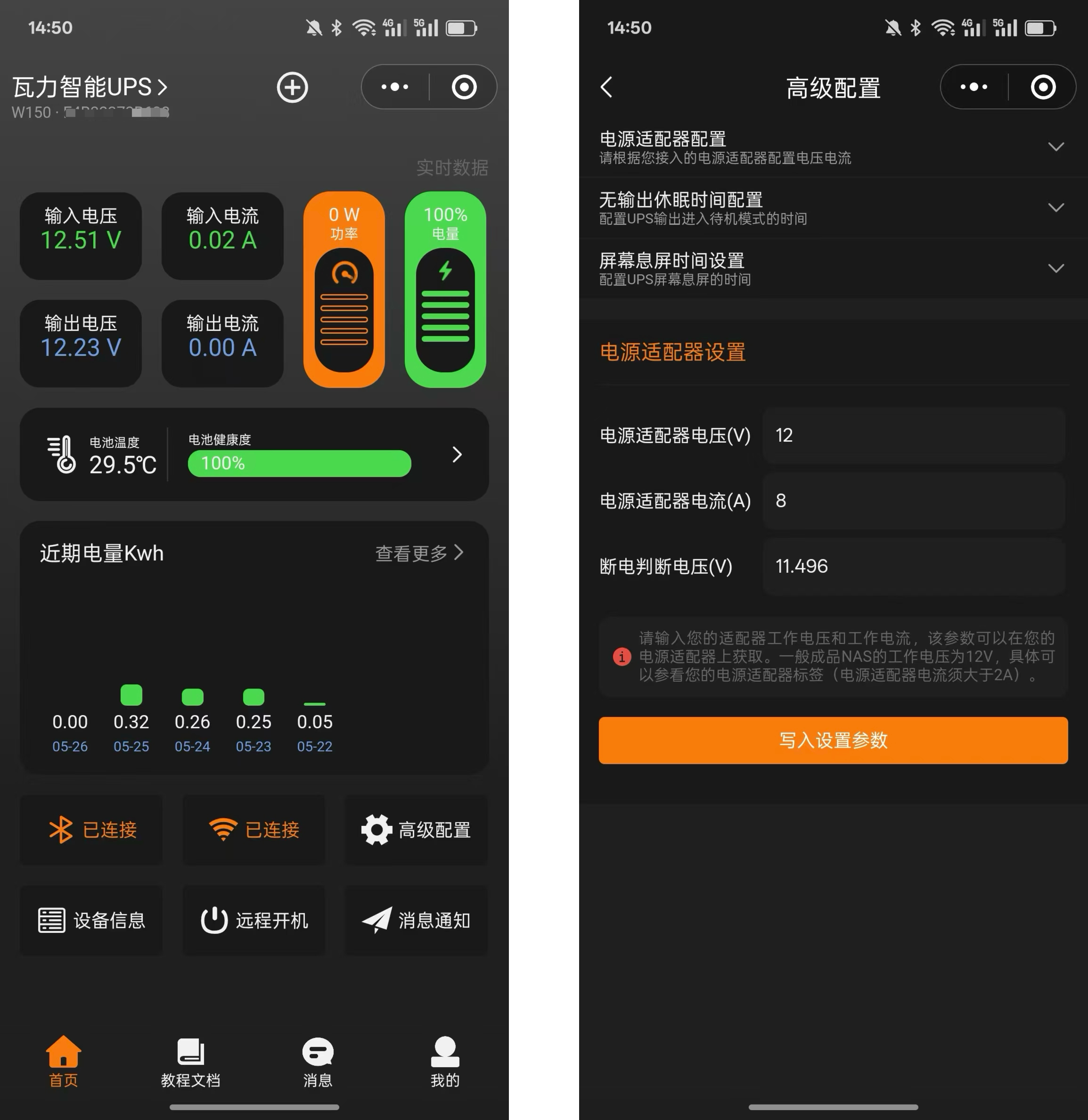
- Power Adapter Voltage (V): Refers to the output voltage of your power adapter under normal operation. After setting this parameter, when the mains power fails, the UPS will continue to supply power to the NAS at this voltage. You can refer to the adapter’s nameplate or the real-time data displayed in the app.
- Power Adapter Current (A): Refers to the maximum current that the adapter can carry. This parameter determines the maximum output power of the adapter. Please fill it in truthfully according to the OUTPUT item on the adapter’s nameplate.
- Power-off Judgment Voltage (V): Refers to the critical voltage that triggers the UPS battery to intervene. When the input voltage is lower than this value, the UPS will determine it as a power failure and switch to battery power. This parameter is automatically calculated by the system when the adapter voltage is modified, and usually does not need manual modification unless there are special requirements.
Example Illustration
Taking a common power adapter as an example:

As shown in the figure above, the output parameters of this adapter are 12V 7.5A. In the app settings:
- Power Adapter Voltage: Enter
12 - Power Adapter Current: Enter
7.5 - Power-off Judgment Voltage: Keep the value automatically calculated by the system.
Precautions
[!CAUTION] Key Step: After setting the parameters, you must restart the device (lightly poke the reset hole) for the new configuration to take effect.
- Fill in Truthfully: Please be sure to fill in according to the adapter’s nameplate parameters. Incorrect voltage configuration may cause the UPS to fail to charge, or damage your NAS device due to high output voltage.
- Dynamic Adjustment: If you find that the power adapter does not reach the rated voltage under actual load, please appropriately lower the power adapter voltage in the settings based on the actual voltage observed in the app.
- No Transformer Function: WalleCube UPS does not have a transformer function. During mains power supply, the input voltage and output voltage are the same. Do not use a power adapter that is incompatible with your NAS rated voltage.